

Google Business Profile for Painters
A Google Business Profile can be one of the first things a potential customer sees when they search for a painter.
It can be one of the main places customers see and interact with your business in Google Search and Maps.
But having a profile is not the same as setting it up properly.
For painters, there are some important decisions to get right. You need to know whether the business should be set up as a service-area business, whether the address should be visible, which categories and services genuinely describe the company, and how potential customers should contact you.
I would also avoid treating every part of the profile as somewhere to insert keywords.
The better approach is to make the profile accurately represent the painting business, show useful proof of the work and make the next step easy for a potential customer.
There is another important limit to understand.
A well-managed Google Business Profile can support local visibility, but it cannot solve every Google Maps ranking problem. Google’s local-ranking guidance considers relevance, distance and prominence among the factors that determine which local businesses appear.
So before looking at categories, services, reviews or photos, it helps to understand exactly what the profile is supposed to do.
What Is a Google Business Profile for a Painting Business?
A Google Business Profile is the business information you can manage on Google Search and Google Maps.
Google allows eligible businesses that either serve customers at a physical location or travel to customers to create a Business Profile. That makes it particularly relevant to painters, because many painting businesses work at customers’ homes, commercial properties or project sites rather than from a traditional shopfront.
For a painter, the profile can help a potential customer understand who the business is, what painting work it offers, where it operates, when it is available, what previous customers think and how to make contact.
It can also contain photos and videos of the business and its services, while verified businesses can collect and respond to customer reviews.
I see the profile as a short version of the business.
A customer should be able to understand:
Who is this company? What painting work does it offer? Does it work in my area? Can I see examples of its work? What do previous customers say? How can I call, visit the website or request a quote?
That is why I would not approach Google Business Profile optimisation as a list of fields to fill with SEO phrases.
The profile should represent the same painting business that exists on the website and in the real world.
Google Business Profile optimisation is not the whole of Google Maps SEO
This distinction matters.
Google Business Profile optimisation focuses on the information and features within the profile: business details, categories, services, photos, reviews, service areas and other profile information.
Google Maps visibility is broader.
Google says local results consider how relevant a business is to the search, how far it is from the person searching, and how prominent or well-known the business is.
So a painter can have an accurate, well-managed Business Profile and still be more visible in one part of the service area than another.
That is not automatically a sign that another field needs to be added to the profile.
Sometimes the next question is about the wider local search picture.
Learn how Google Maps SEO for painters works →
Before optimising anything, though, the first practical step is making sure you are working with the correct Business Profile and that you are authorised to manage it.
Add, Claim and Verify Your Google Business Profile
Before changing categories, services, photos or reviews, make sure you are working with the correct profile.
A painting business may already appear on Google even if the owner has never actively managed the listing. Search for the business name and location first.
If the correct profile already exists, claim it rather than creating another one. Google’s guidelines recommend one profile per business, because duplicates can cause problems with how business information appears in Search and Maps.
If the profile has already been claimed by someone else, resolve the ownership rather than creating a replacement profile.
Claiming and verification are different
It helps to separate these two ideas.
Claiming means taking authorised control of an existing Business Profile.
Verification is Google’s process for confirming that you are authorised to represent the business.
Verification is required to manage important profile information and interact with customers through the Business Profile.
For a painter, that may involve providing evidence that the business genuinely operates in the way described by the profile.
Use the verification method Google gives you
There is no single verification method that every painting business can choose.
Google currently determines the available verification methods automatically based on factors such as business type, public information, region and business hours. Some businesses may also be required to verify using more than one method.
Depending on the profile, the available options can include phone or text, email, video recording, live video or mail.
Video verification can be used for storefront, service-area and hybrid businesses, with the evidence required depending on the business type.
For a painting company, follow the verification instructions Google shows inside the profile rather than relying on an old guide that assumes every business can verify by postcard, phone or another fixed method.
Google says the review after verification can take up to five business days, although some profiles may be verified sooner.
Verification is not an SEO tactic.
It is a business-authentication step.
Once the correct profile is claimed and verified, the next important question for many painters is what type of business the profile should actually represent.
Is Your Painting Business a Service-Area Business?
For many painters, this is one of the most important Google Business Profile setup decisions.
A painting company may be registered at a home, office or workshop, but that does not automatically mean customers are served at that address.
Most painting work happens at the customer’s property.
So before adding suburbs or changing the address, establish how the business actually serves customers.
Service-area business, storefront or hybrid?
Google describes a service-area business as one that travels or delivers directly to customers but does not serve them at its business address.
That is a common setup for painters who run the company from home or another private base and complete all painting work at customer properties.
A hybrid business both serves customers at its business address and travels to customers. Google says hybrid businesses can show a storefront address and also define a service area.
For a painting business, the practical question is simple:
Can a customer genuinely come to this location and receive service there?
If the answer is no, do not show an address simply because a visible address feels more established.
The profile should reflect how the business actually operates.
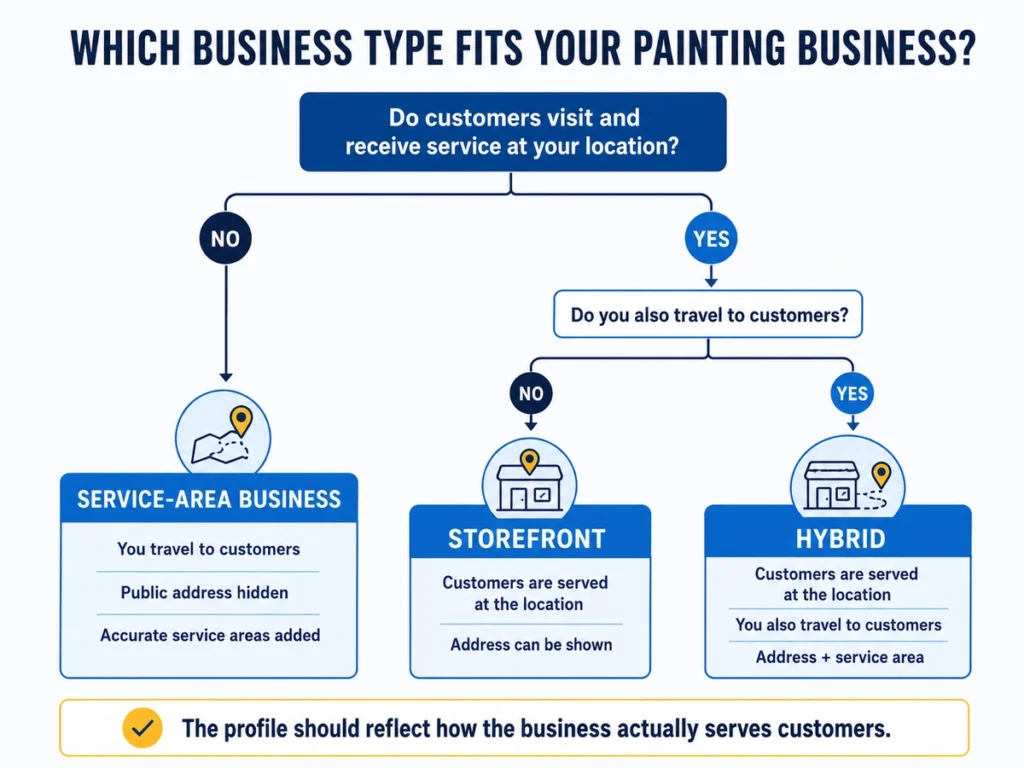
Should a painter show the business address?
If customers are not served at the address, Google says the address should not be shown publicly and the business should use service areas instead.
This is particularly relevant to painters operating from a residential address.
A home can still be the business base.
But if customers do not visit that home to receive painting services, the public profile should represent the company as a service-area business rather than presenting the home as a storefront.
The important distinction is not whether the business has an address.
The question is whether customers are actually served there.
Set service areas to reflect where you really work
Once the business type is correct, use the service-area field to describe where the painting company operates.
Google currently allows up to 20 service areas. These can be based on cities, postcodes or other supported areas. Service areas can no longer be defined simply as a radius around the business.
Google also recommends keeping the areas specific and accurate. Its current guidance says the overall service area generally should not extend more than about two hours’ driving time from where the business is based, although there can be exceptions for businesses that reasonably operate farther away.
For a painter, use locations the business genuinely serves.
If the company regularly works in Ipswich, Springfield, Ripley and nearby areas, those may make sense.
Do not add distant suburbs simply because you want rankings there.
And there is no need to fill all 20 available slots just because Google allows them.
Do service areas make you rank in those suburbs?
This is where service areas are often misunderstood.
Adding a suburb to Google Business Profile does not mean Google promises to rank the business strongly in that suburb.
The service-area setting tells customers where the business provides its services. Google’s separate ranking guidance still considers distance, relevance and prominence when determining local results.
It helps to separate two ideas:
Service area: Where does the painting business genuinely work?
Maps visibility: Where does Google actually show the business strongly for a particular search?
They are not necessarily the same thing.
A painter may legitimately serve ten suburbs but have much stronger Maps visibility closer to its business base and weaker visibility farther away.
That does not automatically mean the service-area settings are wrong.
It may be a wider local search issue.
That is why service areas should describe the operating area rather than becoming an SEO list of suburbs the business wants to rank for.
Once the business type, address visibility and service areas are correct, the next step is making sure the core information accurately represents the company.
Get the Core Business Information Right
The basic information on a Business Profile may look straightforward, but this is what customers use to recognise and contact the company.
Google’s guidelines centre on representing a business accurately and consistently in the real world.
Treat these fields as business information first, not as extra places to insert keywords.
Use your real business name — not an SEO version of it
The profile name should be the name customers know the painting company by.
Google says the name should reflect the business’s real-world name as consistently used on its website, signage, stationery and other branding. It also says unnecessary information should not be added to the name field.
If the business name is:
ABC Painting
use:
ABC Painting
not:
ABC Painting | House Painter | Exterior Painter Brisbane
simply because those are useful search phrases.
Services, locations and categories have their own places in the profile.
The business-name field is for the business name.
This remains true even if competitors are using keyword-heavy names.
Do not change the business identity just to imitate another listing.
Keep the phone number accurate and useful
The phone number should connect potential customers to the business represented by the profile.
The practical question is not only whether the number is correct, but what happens when someone calls.
Can customers reach the business during the stated hours? Is there a useful voicemail if the call is missed? Can quote enquiries be returned?
Those are not ranking factors.
They are conversion basics.
I would also avoid claiming that a particular type of phone number improves rankings simply because it has a local area code.
The important thing is that the number is legitimate, current and useful.
Keep business hours current
Your business hours should reflect when customers can reasonably expect the company to be available.
Google allows businesses to edit normal hours and use special hours when schedules temporarily change for holidays, events or other circumstances.
For a painter, use the hours that genuinely represent how the business operates.
If they change, update them.
A customer should not see the company marked as open, call for a quote and discover that nobody is available.
Use the correct website destination
Make sure the website connected to the profile belongs to and represents the same business.
Check that the destination is current, works properly and does not point to an old or unrelated page.
We will look at what should happen after someone clicks the website link in the next section.
Choose the Right Categories and Painting Services
Categories and services are related, but they are not the same thing.
A useful distinction is:
Categories describe what the business is. Services describe what the business offers.
Keeping that clear prevents the profile from becoming a collection of keyword variations.
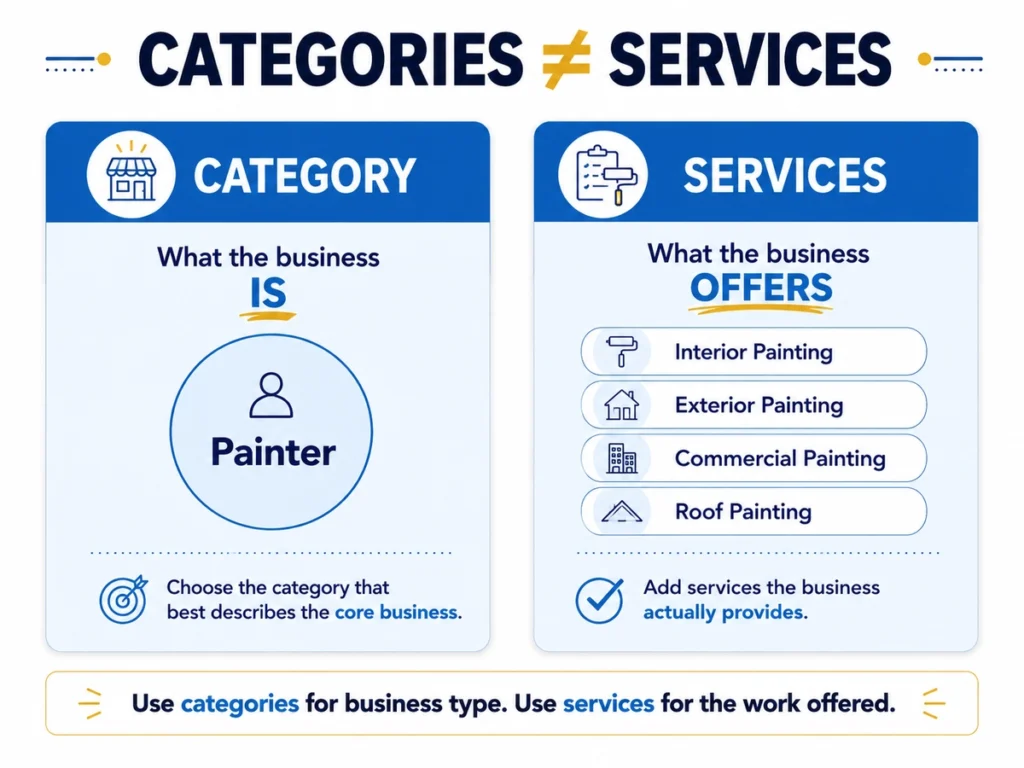
Choose the primary and additional categories carefully
The primary category should describe the core business as accurately as possible.
Google recommends choosing specific categories that represent the main business and using as few categories as needed. It explicitly says categories should complete the idea “This business IS a…” rather than describe everything the company happens to offer.
For many painting companies, a category such as Painter may be the natural starting point if it is available in the profile and accurately represents the business.
Additional categories can make sense when they describe another genuine part of the company.
Do not add unrelated categories simply because you want more search visibility.
More categories are not automatically better.
Add the painting services you genuinely offer
Services are where you can describe the actual work provided.
Depending on the business, that might include interior painting, exterior painting, residential painting, commercial painting, roof painting, cabinet painting or other services the company provides.
Google’s Services feature can provide suggested services based on business type, and custom services can also be added. Services can be organised and may include additional information such as descriptions or prices. Google also says a service may be highlighted on the profile when a local customer searches for it.
That makes the Services section useful.
But it does not mean:
“Add exterior painting and you will now rank for exterior painter.”
Google does not make that promise.
The service helps describe what the company offers.
It does not guarantee a Maps position.
Keep service names clear
Use language customers can understand.
If the company offers exterior painting, Exterior painting is clear.
There is little value in creating several near-duplicate entries such as:
“Exterior painter”, “Exterior painting”, “Exterior house painter”, “Professional exterior painter” and “Exterior house painting service”
when they are all trying to describe the same underlying service.
The goal is not to build a keyword list inside Business Profile.
It is to make the offer understandable.
Write the Business Description for Customers
The business description gives you room to explain the company in normal language.
Google says this field should contain useful, honest and relevant information about the business, including its services, products, mission or history. It should not focus on promotions or prices, and links are not allowed in the description.
Start with what matters to the painting business.
A residential painter might explain that it handles interior and exterior repainting, preparation work and other residential projects.
A company that also works on commercial properties can make that clear.
The point is to help a customer understand the business.
Use natural service language
There is nothing wrong with mentioning actual services.
If the company provides exterior painting, saying exterior painting is natural.
The problem starts when the description becomes something like:
House painter Brisbane, exterior painter Brisbane, interior painter Brisbane, commercial painter Brisbane, best painters Brisbane…
That is not helping someone understand the business.
It is repeating search phrases.
Write for clarity first.
The category explains what the business is.
The Services section explains the work it offers.
The description gives those facts useful context.
If the company has a genuine point of difference — for example, commercial capability, particular project experience, a long operating history or a specialist service — that can also be explained.
Avoid unsupported claims such as “Brisbane’s #1 painter” or “the best painter in Australia” without a legitimate basis.
A useful test is simple:
If a potential customer reads only the description, will they understand what kind of painting business this is?
If yes, the description is doing its job.
Once the profile makes the business clear, the next question is practical: how easy is it for someone to take action?
Make the Next Step Easy for Potential Customers
A Google Business Profile should not only help someone discover the company.
It should make it easy to move from:
Find the business → understand the business → trust the business → take the next step.
For a painter, that next step may be a phone call, website visit or quote request.
Make sure the phone path works
Do not stop at checking whether the phone number is technically correct.
Test what happens when someone actually calls.
If calls regularly go unanswered, voicemail is unclear or nobody follows up on missed quote enquiries, visibility alone will not solve the problem.
A painter can appear prominently and still lose opportunities because the contact path is weak.
Send website visitors somewhere useful
A website click matters only if the visitor lands somewhere helpful.
The page should make it easy to understand important painting services, see evidence of completed work, understand where the business operates and find a clear contact or quote option.
The Business Profile and website do not need to use identical text.
They should describe the same company.
Make quote requests simple
Painting is usually not an instant-purchase service.
A customer may need to describe the property, explain the work, ask about availability, arrange an inspection or request a quote.
Make that first contact easy.
The form can ask for information the painter genuinely needs, but unnecessary friction should be removed — particularly on mobile.
This is conversion work, not a Google ranking claim.
Once the customer can understand and contact the company easily, the next task is providing proof.
Use Real Painting Project Photos
Painting is a visual service.
A customer may want to see the quality of the finish, the types of properties you work on, the preparation involved and the final result.
Google encourages businesses to add photos and videos of their services and says images can make a profile more attractive and informative to customers.
For painters, I would treat photos as project proof, not decoration.
Useful examples include before-and-after results, interior and exterior work, commercial projects, preparation, detailed finishes, team activity and completed jobs.
The mix should reflect what the company actually does.
If exterior house painting is commercially important, show exterior work.
If commercial painting is part of the business, show commercial projects.
The customer should be able to answer:
Have these painters done work similar to what I need?
Use real evidence, not generic filler
Google recommends photos that are clear, well lit and representative of reality without excessive filtering or significant alteration.
That fits painting businesses especially well.
A completed project is more useful than a polished stock photograph of someone holding a roller.
Stock photography can decorate a page.
It cannot prove that the business completed the work.
Do Google Business Profile photos help rankings?
This needs careful wording.
Google recommends adding photos and videos as part of maintaining and improving a Business Profile, including in its local-ranking guidance.
But Google does not publish a formula such as:
Upload 10 photos every week and your rankings will improve.
Nor does it provide a required image count or monthly upload quota.
So I would not tell a painter that they need 20 photos a month or 100 photos before the profile can rank.
A better approach is:
Add useful project photos when you have work worth showing.
Over time, the profile can build a useful visual record of the services, property types and quality of work the company delivers.
The other major trust signal comes from customers themselves.
Ask for Genuine Reviews Without Trying to Control Them
For a painting business, reviews help potential customers understand what it is like to work with the company.
They can provide reassurance about communication, reliability, preparation, care around the property, workmanship and the finished result.
Google allows businesses to ask customers for reviews, but it has clear rules designed to keep reviews authentic and unbiased.
Treat review generation as a customer-feedback process, not a keyword-building exercise.
Ask real customers for honest feedback
There is nothing wrong with inviting a customer to leave a review.
A natural time may be after the project has been completed and the customer has had a chance to see the result.
The request can be simple:
“Thanks again for choosing us. If you have a moment, you’re welcome to leave an honest Google review about your experience.”
The important word is honest.
Do not make a five-star rating feel required.
Make reviewing easy
Google allows businesses to generate a direct review link and QR code that customers can use to leave feedback.
For a painter, that link might be shared in a thank-you email, follow-up message, invoice or another appropriate post-project communication.
Finish the work.
Thank the customer.
Make it easy to leave feedback.
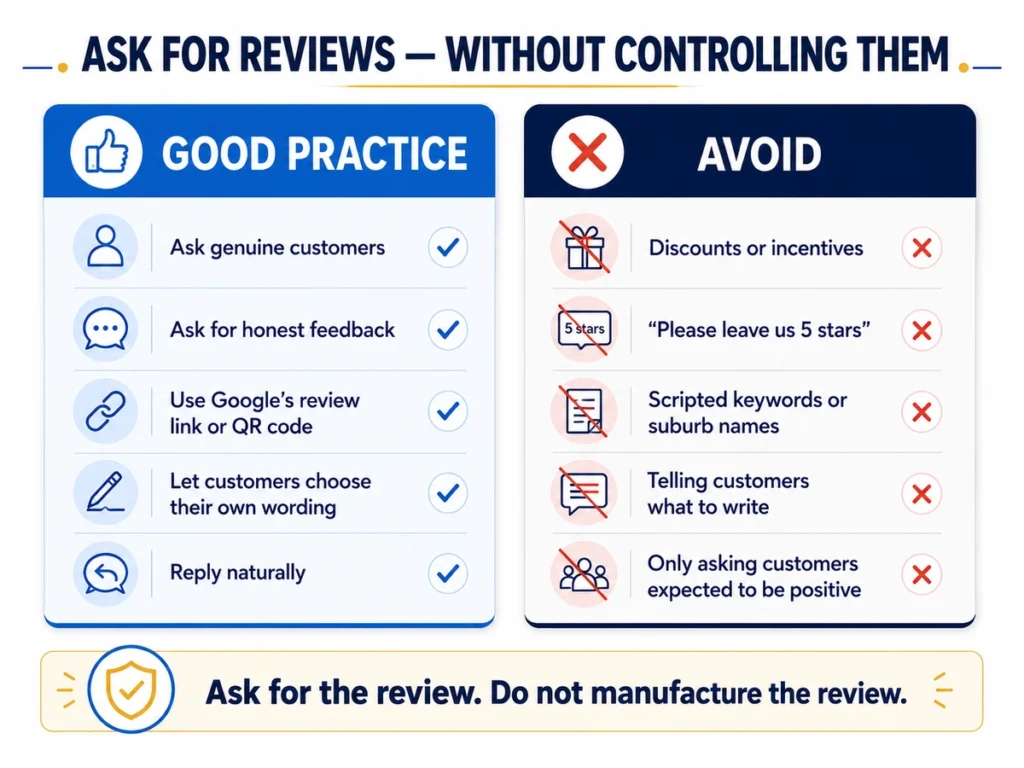
Do not offer incentives
Do not offer discounts, gifts, free work, cash or another benefit in exchange for reviews.
Google explicitly treats incentivised reviews as prohibited fake or biased engagement.
That includes incentives offered to obtain a new review, change a review or remove negative feedback.
Do not tell customers what to write
Avoid review scripts such as:
“Please mention that we did exterior painting in Ipswich and that you recommend us as the best painters in Ipswich.”
If a customer naturally mentions the service, suburb or finished result, that is fine.
But Google’s review policy says merchants should not request that specific content be included in a review.
Let customers describe their experience in their own words.
Do not selectively ask only for positive reviews
Google also prohibits selectively soliciting positive reviews or discouraging negative ones.
So avoid a system that sends happy customers to Google while directing unhappy customers somewhere private.
Make the opportunity to leave feedback available without trying to control the outcome.
Reply naturally
Review responses should sound like a business responding to a customer.
If someone compliments an exterior repaint, acknowledge the project.
If a customer raises a genuine concern, respond professionally.
Do not turn every reply into something like:
“Thank you for choosing ABC Painting, the best exterior painters in Brisbane for residential and commercial painting.”
The response is for the customer, not another place to repeat search terms.
A simple principle works well here:
Ask for the review. Do not manufacture the review.
Once the profile contains useful project proof and customer feedback, the next job is keeping the information current.
Keep the Profile Useful and Current
A Google Business Profile is not something to set up once and then forget.
Painting businesses change.
Hours change. Services change. New projects are completed. Contact details change. The operating area may change.
Keep the profile aligned with the business.
Use Posts when you have something useful to share
Google Business Profile Posts can be used to share updates, offers, announcements and events directly with customers on Search and Maps.
For a painter, that might include a completed project, seasonal availability, a genuine offer, a new service or an important company update.
What I would not do is create a rule such as:
Post every week because Google rewards frequent posting.
Google explains Posts as a customer communication feature. It does not publish a weekly posting frequency that guarantees better local rankings.
If you have something useful to communicate, post it.
If not, do not publish filler simply to satisfy an SEO calendar.
Update information when the business changes
If the phone number changes, update it.
If normal or special hours change, update them.
If a service is no longer offered, remove or revise it.
If the operating area changes, review the service areas.
If the website destination stops being useful, fix it.
The information someone sees today should describe the business as it operates today.
Add new project proof when it is worth showing
As suitable projects are completed, add strong new photos.
Not because you need to hit a weekly quota.
Because the portfolio should continue to represent the work the company is doing.
This is the difference between initial optimisation and ongoing maintenance.
Initial optimisation gets the structure right.
Maintenance keeps it right.
The profile should stay current because the business itself is active, not because we are trying to manufacture activity.
Keep Your Google Business Profile and Website Connected
A Google Business Profile should not feel like a separate version of the painting company.
If someone finds the business on Google, clicks through to the website and sees a completely different picture, that creates confusion.
Both should describe the same company.
Make sure both represent the same services
Suppose the Business Profile presents the company as a residential and commercial painter offering interior, exterior and roof painting.
The website should make those services understandable too.
If roof painting appears prominently in GBP but the website gives no evidence that the company provides it, investigate why.
The profile and website should not contradict each other about the business name, main services, contact information, operating area or quote process.
They do not need identical wording.
They need a consistent underlying business.
Give important services proper website support
A Business Profile can tell someone that exterior painting is offered.
The website can go further.
It can explain the type of work handled, property types, preparation, completed projects and the quote process.
But I would not create a separate website page for every phrase entered into the Services field.
A page should exist because the service is important enough to justify useful content for customers.
Use the website to provide evidence the profile cannot
A Business Profile gives customers a quick overview.
The website can provide much deeper evidence through project examples, service information, case studies, company details, FAQs and quote information.
Think about the customer moving between Google and the website.
Does it look like the same company?
Can they find the services they just saw?
Can they see evidence of the work?
Can they understand where the company operates?
Can they request a quote easily?
If yes, the two properties are supporting each other.
Common Google Business Profile Mistakes Painters Should Avoid
Many GBP mistakes come from trying too hard to “optimise” the profile. Others come from leaving old information untouched.
The main problems I would check are:
- Keyword-stuffing the business name. Use the real trading name, not an SEO version of it.
- Using the wrong business setup. A painter working from home should not present that home as a public storefront if customers are not served there.
- Treating service areas as ranking targets. Add locations because you work there, not because you want Google to rank you there.
- Adding unnecessary categories or services. They should describe the company, not every phrase you want visibility for.
- Letting phone numbers, hours or website details become outdated.
- Using generic stock imagery instead of project evidence.
- Offering incentives for Google reviews.
- Telling customers which keywords, services or suburbs to mention in reviews.
- Turning review responses into SEO copy.
- Following artificial posting or photo quotas without a business reason.
- Treating the Business Profile as the entire local SEO strategy.
Google’s own guidelines emphasise accurate business representation, genuine reviews and complete, current information rather than artificial manipulation of profile fields.
A useful rule is:
Do not optimise the profile until it stops looking like the real business.
Make it accurate.
Make it useful.
Avoid policy shortcuts.
Then measure what happens.
How to Measure Google Business Profile Performance
Once the profile is accurate and properly maintained, look at what customers actually do with it.
It is easy to measure GBP work by asking:
Have we completed all the fields?
But a complete profile is not the same as a useful profile.
A better question is:
Are the right people finding the painting business, and are they taking useful actions after they find it?
Google provides Business Profile Performance data for verified profiles. It shows how customers discover and interact with a Business Profile through Search and Maps, including views, clicks and other interactions.
Establish a starting point
Before making substantial changes, record the current position where useful.
Then compare meaningful periods rather than reacting to one day or one week.
Painting demand can change because of seasonality, weather, holidays, business availability and other factors.
Look for trends rather than isolated numbers.
Look beyond profile completeness
A useful review might include how people discover the profile and what they do next.
If website clicks increase, what happens after the visitor reaches the website?
If more customers use the phone action, are those contacts producing quote enquiries?
A profile can receive more visibility without necessarily producing better leads.
That is why I would not make profile views the final success metric.
The commercial question is closer to:
Did useful enquiries come from people finding the painting business through Google?
Where reliable tracking exists, compare Business Profile activity with website enquiries, phone enquiries, quote requests and ultimately real jobs.
Do not pretend every customer journey can be attributed perfectly.
Someone may discover the business in Maps, visit the website later and contact the company through another channel.
The aim is to build a better picture, not claim perfect attribution.
Business Profile Performance is not Maps rank tracking
This distinction matters.
Business Profile Performance tells you about discovery and interaction with the profile.
It does not show exactly how strongly the business appears from every location across its service area.
A painter can receive calls and website clicks while still having uneven Maps visibility across different suburbs.
That geographic question needs a different measurement approach.
I cover that separately in Google Maps SEO for Painters, including how geo-grid tracking can be used to measure local visibility from different search locations.
For this page, the principle is simpler:
Measure what people find, what they do next, and whether those actions are producing useful business enquiries.
If the profile is accurate but the company still struggles to appear across important parts of its market, another GBP edit may not be the answer.
What Google Business Profile Optimisation Cannot Fix
This is where I draw an important line.
A painting business can have the correct business type, accurate information, appropriate categories and services, service areas, strong project photos, customer reviews and a useful website link — and still not appear equally strongly everywhere it wants to work.
That does not automatically mean the profile needs more optimisation.
Google says local results depend on relevance, distance and prominence, and there is no way to request or pay Google for a better organic local ranking.
Once the profile represents the company properly, repeatedly editing fields in the hope of fixing every visibility problem can become counterproductive.
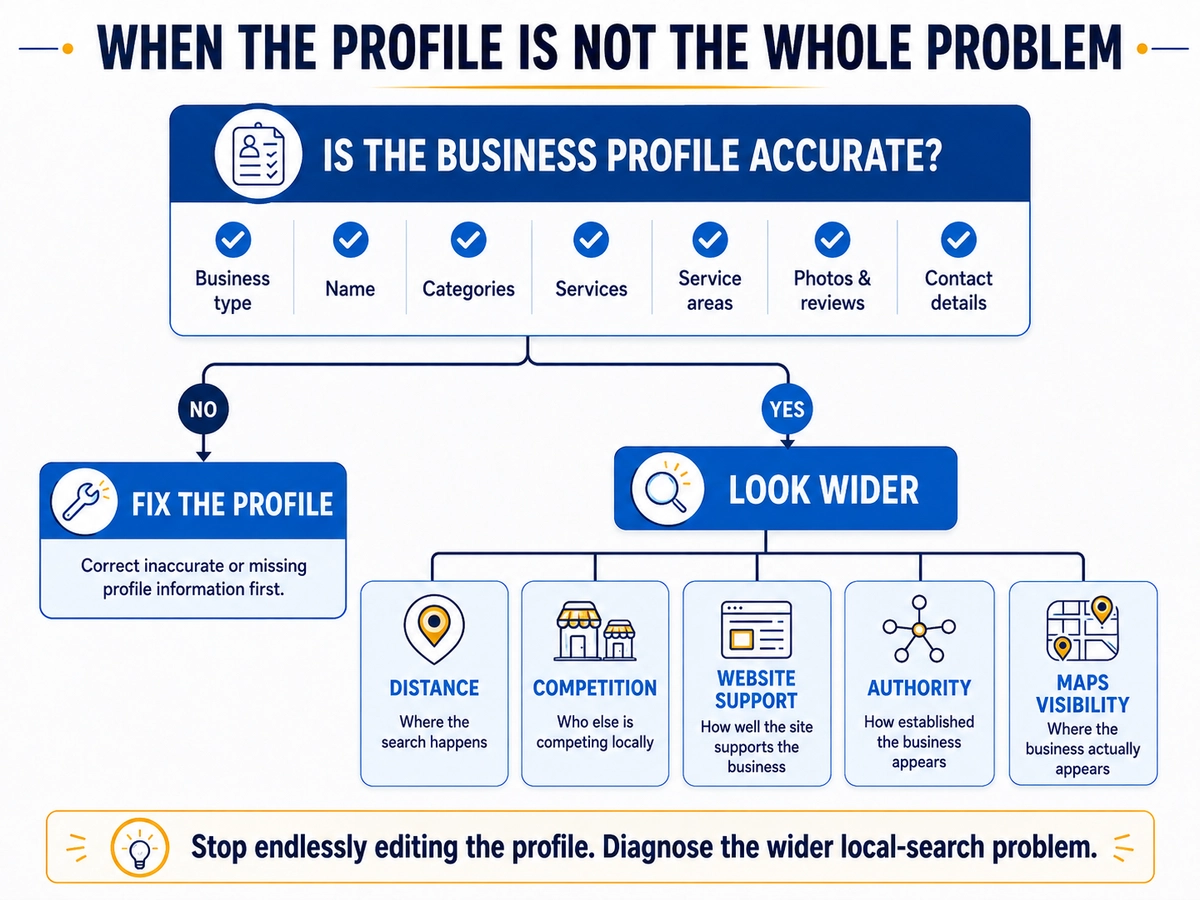
It cannot remove the effect of distance
Google considers how far a potential result is from the person searching.
That matters greatly for painting businesses.
A painter may legitimately work across a large area, but the searcher is not standing in the same location in every suburb.
Maps visibility can therefore change as the search location changes.
An accurate Business Profile cannot make geographic distance disappear.
Adding more service areas does not guarantee rankings there
The service-area setting tells customers where the company provides its services.
Google does not say that entering an area guarantees stronger organic Maps visibility there.
A useful distinction is:
Service coverage tells customers where you work. Ranking coverage tells you where Google is actually showing you.
They are related, but they are not the same thing.
It cannot fix every relevance problem with more fields
Complete and accurate profile information helps Google understand the business and match it to relevant searches.
But there is a point where adding more service entries or changing descriptions stops being the right response.
If commercial painting is a real part of the company but there is little supporting information or evidence anywhere else, the wider business presence may need attention too.
The Business Profile does not exist in isolation.
It cannot fix a weak website by itself
GBP optimisation cannot repair a website where important services are difficult to find, quote forms do not work, contact information is outdated, project evidence is missing or mobile visitors struggle to use the site.
Those are website problems.
Fix them on the website rather than trying to compensate with more profile changes.
It cannot make stronger competitors disappear
Google compares possible local results.
A competing painter may be closer to the searcher, more relevant to the specific search or more prominent.
Google specifically says prominence can draw on information such as links and reviews, and more reviews and positive ratings can contribute to local ranking.
So I would never promise:
Complete these GBP fields and you will move into the Top 3.
The job is to improve the parts we can legitimately improve and then measure what happens.
It cannot guarantee equal visibility across every suburb
A painter can work across many suburbs.
The profile can accurately describe those service areas.
The website can support the services and locations.
And Google can still show the business differently depending on where the search happens and what the person searches for.
If the real question is:
Where does this painting business actually appear in Google Maps across its market?
then it is time to measure the wider Maps visibility rather than continuing to edit profile fields.
Learn how Google Maps SEO for painters works →
Know when to stop editing the profile
If the business name is wrong, fix it.
If the category is wrong, correct it.
If services are missing, add them.
If the address setup does not reflect how the business operates, correct it.
If the profile has almost no useful project proof, improve it.
But once the profile accurately represents the painting business, stop assuming another field edit must be the answer.
At that point, the question changes from:
What else can I optimise in the profile?
to:
What is actually limiting the business’s local visibility?
That is a much more useful question.
Frequently Asked Questions About Google Business Profile for Painters
Not Sure Whether Your Painting Business Profile Is Set Up Properly?
A Google Business Profile can look complete and still have problems underneath.
The business type may be wrong.
The address may be shown when it should be hidden.
Categories or services may not accurately reflect the business.
Or the profile may already be set up correctly while the real problem sits somewhere else — such as Maps visibility, the website, competition or another part of the local search picture.
That is why I would not recommend changing more fields until I understand the starting point.
If you are unsure whether your painting business profile is set up properly, send me your website and Google Business Profile.
I will review how the business is currently represented, look for obvious setup or optimisation issues, and identify what I would investigate first.
If the Business Profile itself is not the main problem, I will tell you that too.